
How to remove review on google and safeguard your business reputation
That sinking feeling when a one-star review pops up is something pretty much every business owner knows. Before you jump into crisis mode, take a breath. Your first move isn’t to panic; it’s to figure out what you’re dealing with.
While you can’t just hit a “delete” button on a review you don’t like, you absolutely can request Google to remove reviews that break its rules. The trick is knowing the difference between legitimate negative feedback and content that crosses the line into spam or harassment. Getting this right is the most important first step in managing your reputation.
At Divramis SEO Agency, we help businesses build resilient, powerful online reputations that drive real growth. If you’re ready to move from a defensive position to a proactive strategy, contact us for a free audit and let’s build a reputation that can withstand anything.
Your First Move When a Negative Google Review Appears
The key here is to distinguish between a review that’s simply negative and one that actually violates Google’s content policies. This distinction changes everything.
Think of it as a quick triage. A genuine, though painful, review about slow service is something you have to tackle with a public response. But a review from a fake profile, one loaded with hate speech, or something completely off-topic? That’s a prime candidate for removal. This calm, methodical approach is how you start to regain control.
Flag or Respond? A Quick Decision Guide
So, what’s your first action? It all comes down to the review’s content. Is it a real customer with a real complaint, or is there something else going on?
- Legitimate Criticism: This is feedback about your service, products, or overall customer experience. It might sting, but it doesn’t break any rules. The right move here is always to respond professionally, not try to get it taken down.
- Policy Violation: This covers a whole range of prohibited content, like fake reviews from competitors, spam, harassment, or conflicts of interest. This is when you flag the review and try to get it removed.
This simple two-path approach is the foundation for handling any negative review that comes your way.
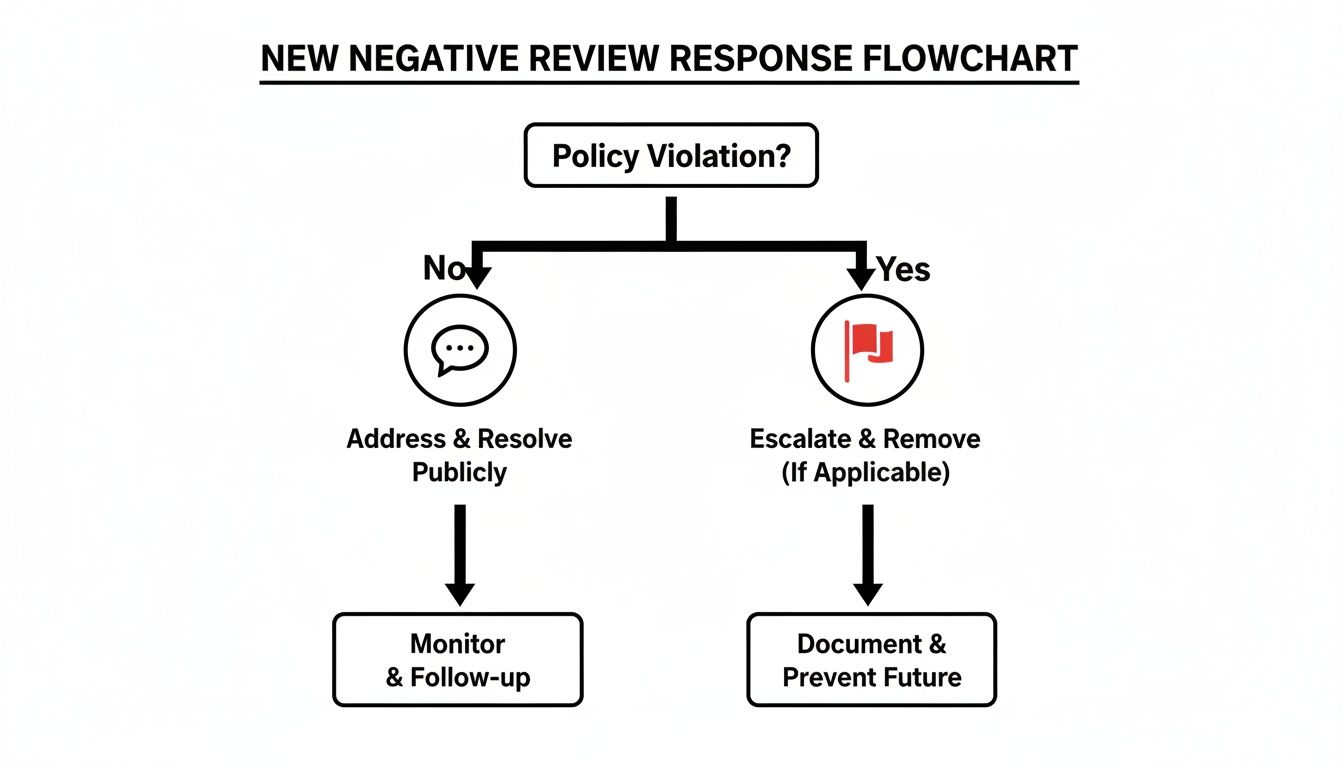
As the flowchart shows, your strategy splits based on one simple question: has a policy been broken? This sends you down the path of either flagging the content or crafting a smart public reply. Mastering your Google Business Profile is a massive part of local SEO, and if you need a refresher, our guide on how to rank first on Google Maps is a great place to start.
Key Takeaway: Don’t waste your time trying to remove reviews that are just unflattering. Focus all your energy on the ones that clearly violate Google’s guidelines—that’s the only route to getting a review successfully removed.
Action Plan for Unwanted Google Reviews
To make this even clearer, here’s a quick-reference table to help you decide what to do in the heat of the moment. Think of it as your cheat sheet for those first five minutes after a bad review lands.
| Review Characteristic | Recommended Action | Example Scenario |
|---|---|---|
| Contains profanity or hate speech | Flag for Removal | A review uses slurs or launches personal attacks against an employee. |
| Appears to be from a competitor or spam account | Flag for Removal | A profile with no other reviews leaves a vague, one-star rating. |
| Criticises service or product quality | Respond Publicly | A customer complains that their coffee was cold or the delivery was late. |
| Is factually incorrect but not a violation | Respond Publicly | A customer mistakenly complains about a service your business doesn’t offer. |
This framework gives you a solid starting point. By correctly identifying what kind of review you’re facing, you can immediately jump to the most effective course of action, which saves a lot of time and stress.
Spotting Reviews That Actually Break Google’s Rules

Before you can even think about getting a negative review taken down, you need to switch from a frustrated business owner to a policy expert. The hard truth is that Google doesn’t remove reviews just because they’re negative or you disagree with them. Your removal request needs to be airtight, pointing to a clear violation of their content policies.
Think of it this way: you’re not just complaining, you’re building a case. Google’s whole game is about providing authentic, helpful information. Any review that poisons that well is a candidate for removal. Your job is to learn their rulebook inside and out so you can spot violations and make your case effectively.
Is It Spam or Just Plain Fake?
This is probably the most common violation we see. Spam isn’t just about someone trying to sell you something; it’s any content designed to manipulate your business’s rating, either up or down.
Keep an eye out for reviews from accounts with generic names and zero review history. Another huge red flag is a sudden flood of one-star reviews all at once, especially if they use similar, vague language. That often signals a coordinated attack, maybe from a disgruntled former employee or a shady competitor.
- A real-world example: A local café in Athens gets hit with four one-star reviews within two hours. Each review vaguely complains about “bad coffee” but offers no details. A quick check shows the reviewer profiles were all created the same day and have no profile pictures. This pattern screams “spam” and is exactly what you should flag.
A review from a bitter ex-employee also counts. This is a clear conflict of interest and a direct policy violation. Proving it can be the tricky part, but if their review even hints at their past employment, you’ve got a solid foundation for your removal request.
When a Review Becomes an Off-Topic Rant
A review is supposed to be about a customer’s experience with your business—the service, the product, the atmosphere. When it spirals into a political tirade, a social commentary, or a personal rant about something totally unrelated, it’s crossed the line.
Google is not a soapbox for general complaints about the world. For instance, if someone leaves a one-star review because they disagree with your company’s sustainability policy but have never actually bought anything from you, that’s off-topic. The feedback has to be directly tied to an actual customer experience.
Pro Tip: When you report an off-topic review, keep your justification short and to the point. Something like: “This review is a commentary on [unrelated topic] and does not describe a customer experience, violating the policy on off-topic content.”
To make identifying these violations easier, I’ve put together a quick checklist. Use this to systematically check if a problematic review breaches any of Google’s specific rules.
Common Google Review Policy Violations Checklist
| Violation Category | What to Look For | Actionable Tip |
|---|---|---|
| Spam & Fake Content | Multiple reviews from new accounts, similar wording, reviews from non-customers or competitors. | Screenshot the suspicious profiles and the timing of the reviews to show a clear pattern in your report. |
| Conflict of Interest | Reviews from current or former employees, or content posted to manipulate a competitor’s rating. | If you can identify the reviewer as a former employee, mention this in your report as a clear conflict of interest. |
| Off-Topic Content | Rants about politics, religion, or social issues unrelated to a customer experience. | In your report, state clearly: “This review is not about an experience with our business.” |
| Harassment & Hate Speech | Personal attacks, slurs, discriminatory language, or threats against you or your staff. | Flag these immediately. These are serious violations and are often handled with priority by Google. |
| Impersonation | A review pretending to be from someone else (e.g., a celebrity or official). | Note in your report that the reviewer is impersonating another individual, which is a specific policy violation. |
| Restricted Content | Links to sites selling illegal goods, promotions for regulated products (e.g., firearms, alcohol). | Report this immediately. Including such links is a clear-cut violation that puts other users at risk. |
Having this checklist handy can turn a moment of frustration into a clear, actionable process. It helps you build a much stronger case for removal when you can point to the exact rule that’s been broken.
Harassment, Hate Speech, and Personal Attacks
This is where Google draws a hard line. They have a zero-tolerance policy for any content that harasses, bullies, or incites hatred. These are the most serious violations, and thankfully, reviews containing them are often removed much faster.
This category covers a lot of ground:
- Direct personal attacks on you or a specific employee.
- The use of slurs or language that discriminates based on race, religion, gender, etc.
- Any threats of violence or harm.
- Posting someone’s private information, like their phone number or home address.
If a review crosses this line, flag it without hesitation. Take screenshots of everything. This evidence is non-negotiable for your report and is crucial if you need to escalate the issue later. This isn’t just a bad review; it’s abuse, and managing it properly is a vital part of building a strong online reputation—something we dive deep into in our guide on local business SEO for small businesses.
Restricted and Illegal Content
Finally, Google’s policies are crystal clear about reviews that promote illegal products or services. This includes any review that contains links to buy restricted goods like firearms, counterfeit items, or unapproved pharmaceuticals.
This also extends to content that encourages dangerous or illegal acts. While this is less common for the average local business, it’s a critical policy to know. If you ever see a review that includes a link to a phishing scam or promotes fraudulent activity, report it immediately. It’s not just about protecting your business; it’s about protecting other users. Learning to spot these different types of violations is the first step in taking back control of your online reputation.
Getting Down to Business: How to Flag and Report a Review
Once you’ve spotted a review that’s clearly out of line with Google’s policies, it’s time to act. This isn’t about getting into a public debate with the reviewer; it’s a formal process to let Google know one of their rules has been broken. Moving quickly and correctly is your best shot at getting the review taken down.
You’ve got two main ways to do this. Knowing how both work lets you pick the right tool for the job, depending on just how tricky the situation is. Let’s walk through each one.
The Quick Flag on Google Maps
This is your go-to, frontline method. It’s direct, fast, and anyone can do it—not just the business owner. You can flag a review in a few clicks, right from the review itself. This approach is perfect for clear, obvious violations that don’t need a lot of backstory.
Here’s how it works:
- Find the Review: Pull up Google Maps and search for your business. Go to your reviews and scroll to the one you need to report.
- Open the Menu: Look for the three vertical dots next to the reviewer’s name and click them.
- Report It: A small menu will pop up. Choose “Report review.”
- Pick the Violation: Google gives you a list of reasons, like “Hate speech,” “Spam,” or “Conflict of interest.” Select the one that fits the situation best.
Once you hit submit, your report is in Google’s moderation queue. It’s incredibly fast, but you don’t get much space to explain the context. That’s why it’s best for slam-dunk cases like spam or offensive language.
Key Insight: Think of the Google Maps flag as your first response tool. It’s built for speed, making it the ideal first move for clear-cut policy breaches that speak for themselves.
Using the Removal Tool in Your Google Business Profile Dashboard
When you’re dealing with something a bit more complicated, your Google Business Profile (GBP) dashboard is the place to go. This tool is exclusively for business owners and managers, and its real power lies in tracking. It’s the right choice when you need to manage several flags or want to keep an eye on a specific case.
The tool centralises everything, giving you a clean dashboard showing every review you’ve reported and its current status—pending, approved, or not approved. It brings a level of organisation to the whole process.
This is your command centre. It offers a transparent view of where every request is in Google’s evaluation process, so you’re not left guessing.
Crafting a Justification That Actually Works
Whether you’re using the quick flag on Maps or the more detailed GBP tool, what you write matters. A vague complaint like “this is fake” is easy for a moderator to dismiss. A short, sharp, evidence-based report is much harder to ignore.
Here’s how to make your report count:
- Be Specific: Don’t just say a review is “fake.” Explain why. For instance: “This person has never been a client. We have zero record of their name, email, or the service described in our appointment system.”
- Quote the Policy: Reference the specific Google rule they’ve broken. For example: “This review violates the ‘Conflict of Interest’ policy. It was posted by a former employee terminated on May 15, 2024.”
- Mention Your Evidence: You can’t attach files in the first report, but you can signal that you have proof. For example: “We have screenshots of this individual harassing our team on Facebook, which can be provided.”
Let’s take a real-world example. A plumbing company in Larissa gets a one-star review claiming a technician flooded their bathroom. The owner checks their CRM and finds no client with that name, address, or service history.
A weak justification: “This is a fake review. Please remove it.”
A strong justification: “This review violates the ‘Spam and Fake Content’ policy. We have checked all service records for the past 12 months and have no record of a client with this name or a service call matching this description. We believe this was posted maliciously to harm our rating.”
The second version is professional, factual, and ties the problem directly to a specific policy. This is the kind of clear, actionable information Google’s team needs to make a quick decision in your favour.
What to Do When Google Rejects Your Removal Request
It’s a uniquely frustrating moment. The email from Google lands in your inbox, blunt and final: your removal request was rejected. You did your homework, found a clear policy violation, and submitted your report, only to hit a digital brick wall.
Don’t give up. That initial rejection is often automated and is far from the final word.
Think of your first report as your opening statement. If it’s denied, your next move is to prepare the appeal. This is your shot to provide the extra context and evidence that an algorithm might have missed. Persistence is everything when you’re trying to get a review removed, and this next phase requires a much more detailed, human-focused approach.
Launching Your One-Time Appeal
After a rejection, Google gives you a one-time opportunity to appeal their decision. This isn’t just about resubmitting the same information—it’s your chance to build a much stronger case. To make it count, you need to bring fresh, compelling evidence to the table.
This is where you collect any documentation that backs up your claim. Did the reviewer send harassing emails or social media messages? Screenshot them. Can your booking system prove this person was never a customer? Take a screenshot of the search results showing no match.
When you submit the appeal, structure your argument clearly:
- Restate the Original Claim: Briefly mention which policy the review violates.
- Introduce New Evidence: Clearly explain what new proof you’re providing. For example, “We are now including screenshots of threatening DMs from this user on Instagram.”
- Connect the Dots: Explicitly spell out how your new evidence proves the violation. Don’t make them guess.
Key Takeaway: The appeals process is your chance to escalate the issue from an algorithm to a human moderator. Provide clear, organised evidence that makes it easy for a person to understand the context and overturn the initial decision.
Escalating Directly to Google Business Profile Support
What happens if your appeal is also denied? Or what if the situation is just too complicated for the standard form? In these cases, you can try contacting Google Business Profile (GBP) support directly. This route is best for particularly severe or nuanced issues, like a coordinated spam attack from multiple fake accounts or a review containing defamatory claims that require a detailed explanation.
Reaching out to support allows for a direct conversation where you can lay out the full story. To prepare, you need to have all your ducks in a row.
Your Support Checklist:
- Your Business Information: Have your business name, address, and GBP link ready.
- The Review Details: Provide a direct link to the review in question and the reviewer’s name.
- Case ID Numbers: Reference the case IDs from your initial report and your appeal. This shows you’ve followed the standard process.
- A Chronological Summary: Write a brief, professional summary of the situation and why the review must be removed.
Approaching GBP support with this level of organisation shows you’re serious and have already exhausted the other options. It elevates your request and increases the likelihood of getting a thorough, manual review of your case.
Considering Legal Options for Defamation
In rare and extreme cases, a review might cross the line from negative feedback into illegal territory, such as defamation. Defamation involves false statements presented as fact that cause tangible harm to your business’s reputation. If a review makes a specific, false accusation—for example, falsely accusing your restaurant of causing food poisoning when you have evidence to the contrary—it might be legally actionable.
Before you even think about going down this path, it is critical to consult with a legal professional who specialises in this area. They can help you understand if the content meets the legal standard for defamation in Greece and explain the process for submitting a legal removal request to Google.
This is the most serious escalation route and should be reserved for only the most damaging and clearly false accusations. Navigating these challenges is a core component of effective online reputation management, which is all about protecting your brand’s integrity across every digital channel.
Responding to Negative Reviews You Cannot Remove
Let’s be honest: some negative reviews sting because there’s a grain of truth to them. Maybe the service really was slow that day, or a customer genuinely had a frustrating experience. When a review doesn’t actually break any of Google’s rules, your removal requests are going to hit a brick wall.
This is the moment your public response stops being a courtesy and becomes your single most powerful tool for managing your reputation.
A thoughtful reply can do more for your business than a dozen glowing five-star ratings. It’s a public display of transparency, professionalism, and a real commitment to your customers. People don’t just read the bad reviews; a staggering 97% of them also read how businesses respond. This is your chance to turn a negative into a public masterclass in customer service, showing everyone you take feedback on board and are dedicated to making things right. This is your stage.
The Anatomy of a Perfect Response
Crafting the right response is an art form. It’s a careful balance of empathy, professionalism, and knowing when to take the conversation out of the public eye. The goal isn’t to win an argument—it’s to de-escalate the situation and show other potential customers that you’re a reasonable, responsive business.
A great response always has a few key ingredients.
- Acknowledge and Thank: Kick things off by thanking them for their feedback, even if it’s harsh. A simple, “Thank you for bringing this to our attention,” shows you’re open to criticism and not immediately on the defensive.
- Empathise and Apologise: Use phrases like, “We’re sorry to hear about your experience,” or, “This isn’t the standard we aim for.” This validates their feelings without you having to admit fault for something that might not have been in your control.
- Take It Offline: This is crucial. Never get into a public back-and-forth. Provide a direct email address or phone number and invite them to discuss the issue privately. It shows you’re serious about finding a solution.
This structure puts you back in control of the narrative. You acknowledge the issue in public but handle the messy details in private, stopping a small fire from turning into a public inferno.
Expert Tip: Never, ever use a generic, copied-and-pasted response for every bad review. Customers can spot a template from a mile away. Personalise each reply by referencing a specific detail from their comment to prove you’ve actually read and understood their complaint.
Response Templates for Common Scenarios
While every reply needs a personal touch, having a few solid templates on hand helps you react quickly and professionally. Think of these as a starting point, ready to be adapted to the situation.
Scenario 1: The Simple Service Complaint
A customer complains about slow service at your café or a long wait time for your call-out service.
Template: “Hi [Customer Name], thank you for taking the time to share your feedback. We are truly sorry to hear that your experience with our service did not meet your expectations. We strive to provide prompt and efficient service, and it’s clear we fell short here. We would appreciate the opportunity to learn more about what happened. Please contact us directly at [email address] or [phone number] so we can address your concerns properly.”
This response is short, apologetic, and immediately moves the conversation to a private channel. Perfect.
Scenario 2: The Factually Incorrect Review
A customer leaves a one-star review complaining about a product you don’t even sell or gets key details completely wrong.
Template: “Hi [Customer Name], thank you for your review. We’ve carefully checked our records and are a bit confused by your comments, as we do not offer [the specific service mentioned]. It’s possible there might be a mix-up with another business. We would be grateful for the chance to clarify this. Could you please reach out to us at [email address] so we can better understand the situation?”
This approach is non-confrontational. It politely corrects the record without calling the customer a liar, keeping your professionalism intact. Understanding the fundamental rules of social media engagement is key here; the goal is to resolve, not to argue.
By mastering the art of the response, you transform a potential liability into a showcase of your commitment to customer care. This proactive approach doesn’t just mitigate the damage from one bad review—it builds a stronger, more resilient online reputation for your business in the long run.
Proactive Reputation Management to Prevent Future Damage
Trying to get a negative review removed often feels like you’re playing defence—always reacting, never getting ahead. A much stronger approach is to go on the offensive. Instead of just reacting to damage, you can proactively build a reputation so solid that the odd negative comment barely makes a dent.
The real goal here is to cultivate a steady stream of genuine, positive reviews that create a powerful buffer of goodwill. Think about it: when a potential customer sees one angry one-star review buried among fifty glowing five-star ones, which one do you think they’ll believe? The negative feedback becomes an outlier, not the main story. This doesn’t just minimise the impact of criticism; it’s also a massive boost for your local SEO.

Ethically Encouraging Positive Reviews
The secret to building this buffer is simple: consistently ask your happy customers for their feedback. But you have to do it the right way. Google’s policies are crystal clear—you can’t offer discounts, gifts, or cash for reviews. The best reviews are the ones you earn, not the ones you buy.
Here are a few effective, policy-friendly ways to work this into your daily operations:
- Email Follow-ups: After a great sale or service, send a personalised email. Thank the customer and politely ask if they’d be willing to share their experience on Google. Timing is everything here—do it while that positive feeling is still fresh.
- QR Codes: Put QR codes that link straight to your Google review page on receipts, business cards, or signs in your store. It makes leaving feedback dead simple for a customer with a smartphone.
- Text Message (SMS) Requests: If you communicate with customers via text, a quick follow-up message with a direct review link can get a surprisingly high response rate. Just make sure you have their permission to text them first.
The easier you make the process, the more likely people are to actually do it. Your job is to remove every bit of friction between their great experience and them telling the world about it.
Navigating Google’s Aggressive AI Filtering
Building a strong review profile has gotten trickier lately. In its fight against spam, Google’s AI has become incredibly aggressive, and it sometimes ends up deleting perfectly legitimate reviews. In 2025, for instance, we saw Google’s moderation in Greece get much tougher, with review deletion rates jumping by over 600% globally.
For small businesses here, this was a huge blow. A local roofer in Thessaloniki might have woken up to find 15% of their five-star reviews had vanished overnight, dragging their average rating down simply because an algorithm flagged them as suspicious. You can read more on how Google’s AI is impacting review management on almcorp.com.
This new reality makes it clear: you can’t put all your reputational eggs in the Google basket. While your Google Business Profile is vital, you need to diversify.
Key Insight: A strong reputation is built on consistency and diversity. Focus on earning authentic reviews across multiple platforms to protect your business from both negative feedback and unpredictable algorithm changes that might try to remove a review on Google without your input.
Actively encouraging reviews on industry-specific sites or other major directories creates a much more resilient online presence. Strengthening your profiles on these platforms is a smart move; you can explore some of the top citation sources and directory listings for local SEO to see where else you should be focusing. This way, even if your Google rating takes an unexpected hit, customers can still find plenty of positive proof of your great work elsewhere online.
Request an SEO Quote Today!
You can subscribe to our newsletter if you want to learn more about us and get on the first page of Google.

I am Yannis Divramis, I am a SEO Expert. I have been doing SEO since 2013.
I run the Divramis SEO Agency and I am very glad that you’ve watched this video and keep watching the other videos, because we are posting every month many videos about SEO.
So, if you run a website and want to rank higher in Google, you can ask now for a website promotion offer and get a quote for us.
Ask now for a website promotion offer
See more post about SEO:
- Boost Your Reputation with a google review link: Quick Setup Guide
- Is Your Site Ready for AI Search? The Future of SEO Explained!
- How to WIN Google’s AI Search: Adapt Your Site NOW
- Aged Domains Odys Global Review