
Boost Your Reputation with a google review link: Quick Setup Guide
A Google review link is simply a direct URL that takes your customers right to the review form on your Google Business Profile. That’s it. No searching, no clicking around, no getting lost. It strips out all the friction, making it ridiculously easy for them to leave feedback.
Think of it as the express checkout lane for building your how to build online reputation—and it’s a game-changer.
Why Your Google Review Link Is a Business Growth Engine
Before we get into the nuts and bolts of how to find your link, let’s be clear on why this matters. This isn’t just about convenience; it’s a strategic tool that pumps life into your local business, builds trust, and directly feeds the algorithms that decide who shows up in local search. For a small business in Greece, getting this right is non-negotiable.
Picture this: you’re a plumber in Larissa. Every single positive review you get is like a digital word-of-mouth referral. It tells potential customers—and just as importantly, Google—that you’re the real deal. More reviews mean you start climbing higher in Google Maps results, which means more calls when someone’s pipe bursts. It’s that direct.
The Power of Social Proof in Local SEO
For a local business, your online reputation is your currency. A steady flow of authentic, recent reviews is powerful social proof that shapes a new customer’s decision. When a tourist is looking for the best taverna in Athens for their holiday, are they going to pick the one with three old reviews or the one with dozens of glowing ones from last week? We both know the answer.
This isn’t just a hunch; the data tells the same story. In Q3 2025, Greece hit the top spot in Europe for tourist satisfaction, a success powered largely by incredible online feedback. An analysis of over 319,000 online reviews, mostly from Google, proved just how much this matters.
The numbers don’t lie: businesses that hit a 4.5+ star rating with at least 50 reviews can see 25% more clicks on their Google Maps listings. That translates directly into more phone calls, more website visits, and more customers walking through your door.
Connecting Reviews to Revenue
In Greece’s competitive service industry, where something like 70% of consumers read reviews before hiring an electrician or calling a roofer, not having a simple review process means you’re basically sending customers to your competitors. Each review you collect with your link strengthens your digital foundation.
Your Google review link makes this entire process seamless. It helps you:
- Get More Reviews, Faster: The easier you make it, the more people will actually do it. Simple as that.
- Climb the Local Rankings: Google’s algorithm loves seeing frequent, positive reviews. It’s a huge signal of relevance and authority.
- Build Real Customer Trust: An active review profile shows you’re confident in your work and that you genuinely care about what your customers think.
Alright, let’s get down to the practical side of things. Now that we’re clear on why reviews are so crucial, it’s time to get your hands on that all-important Google review link. This simple URL is the bridge between a happy customer and a powerful five-star review that boosts your local visibility.
There are a few ways to grab this link. We’ll walk through three solid methods, so you can pick the one that fits you best—whether you’re running a busy taverna in Thessaloniki or a plumbing service in Patras.
This visual breaks down the growth cycle: your link fuels reviews, which in turn fuels growth, bringing you more customers and, you guessed it, more opportunities for reviews.
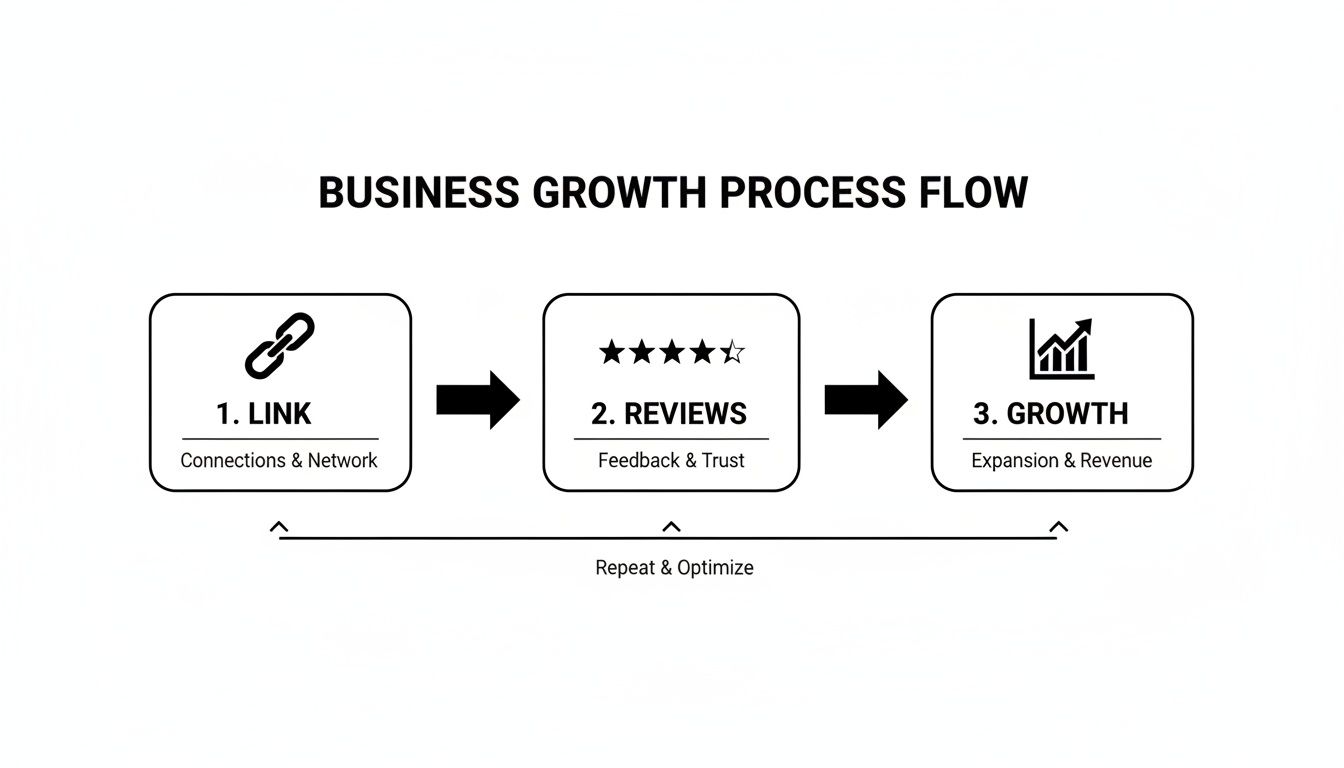
It’s a simple, repeatable process that pays dividends.
The Easiest Method: Your Google Business Profile
For most business owners, the quickest route is straight through your Google Business Profile dashboard. It’s designed to be simple and requires zero technical skill. Google knows how vital these reviews are for local businesses, so they’ve made this incredibly straightforward.
Here’s how you do it:
- Sign into Google: Make sure you’re logged into the account that manages your Business Profile.
- Search for your business: Just type your exact business name into Google Search. Because you’re logged in, a private management panel will pop up right at the top of the results.
- Click “Ask for reviews”: In that panel, you’ll see a button clearly labelled “Ask for reviews.”
- Copy the link: Clicking that button brings up a small window with your unique, ready-to-share Google review link. Just copy it, and you’re good to go.
The best part? This link takes customers directly to the review form for your business, and it even pre-selects five stars to give them a positive nudge. It completely removes any friction, making it far more likely that a satisfied client will actually follow through.
The Most Reliable Method: Using Your Place ID
While the first method is a breeze, Google occasionally changes its URL formats, which can lead to broken links down the road. For a permanent, bulletproof solution, you’ll want to create a link using your Google Place ID.
Think of the Place ID as your business’s permanent digital address—it never changes. This makes it the most stable and reliable option by far.
Expert Tip: The Place ID method is the gold standard. It creates a “forever link” that won’t break, which is perfect for printing on business cards, invoices, or creating QR codes where you can’t just update the URL later.
Finding your Place ID sounds technical, but it’s actually quite easy with Google’s own tool.
First, head over to the Google Maps Platform Place ID Finder. Start typing your business name in the search bar and select it from the list that appears. A map pin will show up with a pop-up containing your unique Place ID—it’s a long string of letters and numbers. Copy that ID.
Next, you just need to tack it onto the end of this base URL: https://search.google.com/local/writereview?placeid=
Paste your unique Place ID right after the = sign, and you’ve got yourself a permanent gateway for customer reviews. This strategy works perfectly with our other optimisation advice, which you can read about in our guide on how to rank first on Google Maps.
The Quick Method: Grabbing a Link from Google Maps
Need a link in a hurry? You can generate one directly from a Google Maps search. This approach is fast and works great for on-the-spot sharing, like in a quick email or a text message.
Just search for your business on Google Maps. When your profile appears on the left-hand side, click the “Share” button. A pop-up window will give you a shortened URL.
Keep in mind, this link sends users to your general Maps listing, not straight to the review form. Still, it’s a very convenient way to guide customers to your profile, where the “Write a review” button is just a click away.
Smart Ways To Share Your Review Link For More Feedback
Getting your Google review link sorted is a great first step, but a link on its own doesn’t gather feedback. The real magic happens when you put that link in front of happy customers at just the right moment. Your goal is to make leaving a review feel like a natural, easy part of their experience with you.
It’s all about weaving the request into your existing customer touchpoints. Think about the entire journey a customer takes with your business, from the first email they get to the final invoice. Each of these moments is a golden opportunity to gently ask for their opinion.
Leverage Your Digital Communications
Your day-to-day digital interactions are the easiest wins for sharing your review link. These methods are simple to set up, surprisingly effective, and they work for you around the clock, bringing in fresh feedback without you lifting a finger.
A fantastic place to start is your email signature. Every single email you or your team sends out becomes a subtle nudge for a review. Just add a friendly, simple line like, “Happy with our service? Leave us a review on Google!” and link the text directly to your review form. Simple.
Post-purchase or post-service emails are also incredibly powerful. A follow-up email sent a day or two after a transaction catches the customer while the experience is still fresh. This is often when their satisfaction is at its peak, making them far more likely to share positive specifics.
For e-commerce stores, this is non-negotiable. Adding your link to the order confirmation page or a “thank you for your purchase” email can generate a steady stream of reviews from verified buyers.
Integrate Into Physical Touchpoints With QR Codes
In the real world, QR codes are your best friend. They brilliantly bridge the gap between a face-to-face interaction and a digital action, making it incredibly simple for customers to leave a review right there on their smartphone.
Imagine you run a local taverna in Athens. You could print a small QR code on your menus or receipts. A customer who just finished an amazing meal can scan the code and write a review before they even leave the table.
This works just as well for service providers. A plumber in Larissa could have a QR code on their business card or on the final invoice they hand over. It’s a professional touch that capitalises on that moment of relief and satisfaction a client feels when a job is done right.
Here are some prime spots to use QR codes:
- Business Cards: An absolute must for any service professional meeting clients in person.
- Invoices and Receipts: Ask for feedback right at the point of payment.
- In-store Signage: Place a small, well-designed sign at your checkout counter or on the back of your front door.
- Product Packaging: For online businesses, a QR code on a thank-you card inside the package is a brilliant personal touch.
Use SMS For Direct and Personal Requests
For a more immediate and personal touch, SMS messages are hard to beat. Text messages have exceptionally high open rates, and they’re usually read within just a few minutes of being sent. This makes them perfect for time-sensitive review requests.
After finishing a service call, you could send a simple, automated text like: “Hi [Customer Name], thanks for choosing us today! We’d love to hear your feedback. You can leave us a review here: [Your Shortened Link].”
The key to success, no matter the method, is all about timing and tone. Your request should feel like a genuine ask for feedback, not a demand. Keep it polite, brief, and always express your gratitude, whether you’re asking via email, SMS, or in person.
Recent data paints a clear picture of why this matters so much for Greek businesses. In Q2 2025, Greece earned an impressive Net Sentiment Score of 39 from US and UK tourists based on Google reviews. For local service providers, where a staggering 82% of Greek consumers read at least 10 reviews before making a decision, a steady flow of new feedback is absolutely vital.
Customised Templates For Greek Businesses
How you ask for a review matters immensely. A generic, robotic message is easy to ignore. A personal, thoughtfully worded request, on the other hand, can dramatically improve your response rate. The principles of good communication are universal, and you can dive deeper into the foundational rules of social media engagement in our detailed guide.
Here are a few templates you can tweak for your own business.
For a Service Provider (e.g., Plumber, Electrician):
- Subject: How did we do today, [Client Name]?
- Body: Γεια σας [Client Name], Thank you for trusting us with your [service type, e.g., plumbing repair] today. We hope everything is working perfectly. If you have a moment, we would greatly appreciate you sharing your experience on Google. Your feedback helps our small business grow. Here is the link: [Your Google Review Link]. Ευχαριστώ!
For an E-commerce Store:
- Subject: Your [Your Brand] order has arrived! What do you think?
- Body: Hi [Customer Name], We saw your order was delivered! We hope you love your new [product name]. We’d be grateful if you could share your thoughts on Google. It only takes a minute and helps others discover us. Leave your review here: [Your Google Review Link]. Enjoy!
Choosing the right channels and refining your messaging will transform your Google review link from a simple URL into a powerful engine for building trust and bringing in new customers.
Review Link Sharing Channel Comparison
To help you decide where to focus your energy, this table breaks down the most common channels for sharing your review link. It compares how much effort each takes to set up against its potential effectiveness.
| Channel | Best For | Implementation Effort | Potential Response Rate |
|---|---|---|---|
| Email Signature | Consistent, low-effort requests from ongoing communications. | Low | Low to Medium |
| Post-Service Email | Capturing feedback when customer satisfaction is highest. | Low to Medium | High |
| SMS/Text Message | Immediate, personal requests with high open rates. | Medium | High |
| QR Code on Receipts | In-person businesses at the point of sale (restaurants, retail). | Low | Medium to High |
| QR Code on Business Cards | Service providers who meet clients face-to-face. | Low | Medium |
| Website “Thank You” Page | E-commerce stores immediately after a purchase is made. | Low | Medium |
| Social Media Posts | Broadcasting a general request to your followers. | Low | Low |
While broadcasting on social media is easy, targeted and timely requests via email, SMS, or QR codes almost always yield better results. Start with one or two channels that best fit your customer journey, and then expand from there.
Go on the Offensive: Advanced Strategies to Get More Reviews, Faster
Alright, you’ve got your Google review link sorted and you’re sharing it. That’s fantastic. But now it’s time to shift from passively collecting reviews to actively driving them. This is how you build real momentum and increase your “review velocity”—the speed at which you bring in fresh, powerful feedback.
Think of it this way: sending your link in an email is like handing out a flyer. It works, but it’s a one-off. Embedding a review button on your website? That’s like putting up a permanent, highly visible billboard. It works for you 24/7, catching customers right when they’re most engaged with your brand and ready to share their thoughts.
Make It a Fixture: Embed a Permanent Review Button on Your Website
Your website is your digital storefront. It’s the perfect place to put out a standing invitation for feedback. A permanent “Leave a Review” button removes all the friction and makes the whole process dead simple for your site visitors. Instead of waiting for you to ask, happy customers can leave a review entirely on their own terms.
So, where should you put it? Based on what we’ve seen work best, here are the prime spots:
- The Website Footer: This is a no-brainer. The button will be visible on every single page without getting in the way.
- The Contact Page: Someone visiting this page is already looking to engage. It’s a natural, logical place to ask for their feedback.
- A Dedicated Testimonials Page: If you’re already showing off your great reviews, why not add a button that invites new visitors to add their own voice to the mix?
By making your Google review link a permanent part of your site, you’re creating a consistent, low-effort channel for collecting valuable feedback that will pay dividends for years.
The Single Most Underrated Strategy: Respond to Every Single Review
This might be the most powerful, yet most overlooked, tactic for encouraging more feedback. When potential customers see you actively engaging with past clients—thanking them for praise and thoughtfully addressing criticism—it sends a massive signal of trust. It proves you’re listening and that you actually care.
This simple act turns a static review page into a living conversation. It tells new customers that their opinion matters and their voice will be heard, which makes them far more likely to contribute. On top of that, Google has openly confirmed that responding to reviews can give your local SEO a nice little boost.
Responding to reviews shows both existing and potential customers that you value their feedback. This interaction builds a sense of community and trust, which often encourages others to share their own experiences.
This is especially true right here in Greece. According to Google’s latest Year in Search data for Greece, there’s been a massive shift in how people make decisions. A staggering 65% of Greeks now check Google reviews before hiring a service, which is a 12% jump from just last year. For any service business in Athens, Larissa, or anywhere in between, your reviews are now your most powerful local SEO tool.
The same data shows that business profiles with over 100 reviews get 2.5 times more visibility in the Google Maps pack. That’s a game-changing advantage when you consider that nearly half of all Google searches are for local information. You can read more about what Greek consumers searched for last year over at protothema.gr.
Work Smarter: Use Link Shorteners for Clean, Trackable Links
Let’s be honest, the default Google review link is a long, ugly mess. Using a URL shortener like Bitly cleans it up instantly, turning it into something short, memorable, and professional. A shorter link is easier to say out loud, looks better on a business card, and just feels less intimidating to click.
But the real magic of a link shortener isn’t just aesthetics—it’s the data.
Most of these services come with click-tracking analytics, which means you can see exactly how many people are clicking your link. This is gold. You can create different short links for different campaigns: one for your email signature, another for SMS requests, and a third for the QR code on your invoices.
By tracking the clicks on each, you’ll quickly figure out which channels are actually working. This data-driven approach turns review collection from a guessing game into a measurable marketing activity. Properly managing these digital assets is just as crucial as securing your spot in the top citation sources for local SEO.
Common Google Review Link Mistakes to Avoid
Putting your Google review link to work is a huge step, but even the best intentions can get derailed by a few common, easily avoidable mistakes. These slip-ups don’t just stop you from getting feedback; they can frustrate customers and, in some cases, even put your business profile at risk.
Let’s make sure your hard work actually pays off by steering clear of these classic pitfalls.
Dealing With Broken or Outdated Links
The most frequent issue we see is a broken or incorrect link. Just picture it: a happy customer, ready to leave you a glowing five-star review, clicks your link only to land on a dead-end error page. That enthusiasm instantly evaporates, and you’ve almost certainly lost that review forever.
It’s a frustrating experience that reflects poorly on your business’s attention to detail.
Links can break for a few reasons, often when Google decides to update its URL structure. A link that worked perfectly last month might suddenly lead nowhere. This is precisely why we’re so adamant about using the Place ID method for creating your review link—it’s simply the most stable and permanent option out there.
If you suspect your link is broken, here’s a quick troubleshooting checklist:
- Test in an Incognito Window: Open a private browser window and paste your link. This shows you exactly what a user who isn’t logged into Google will see.
- Check on Mobile: Always, always test your link on a smartphone. The vast majority of your customers will be using their phones to leave reviews.
- Confirm the Destination: Does the link go straight to the review pop-up, or does it just dump them on your general Maps listing? A direct link removes friction and is always better.
If your link is indeed broken, don’t panic. Just go back and regenerate a new one using the Google Place ID method we covered earlier. It’s the most reliable fix and ensures you have a “forever link” that you can use with confidence on printed materials like business cards and invoices.
The Critical Rule You Must Not Break
This brings us to the most serious mistake you can possibly make: incentivising reviews. It might seem tempting to offer a discount, a free coffee, or a contest entry in exchange for a Google review, but this is a direct, serious violation of Google’s policies.
Google’s stance is crystal clear: reviews must be unbiased and authentic. Offering incentives corrupts this process and can lead to severe penalties, including the removal of all your reviews or even the suspension of your Business Profile.
Think about it from a customer’s perspective. If they see a business essentially “buying” reviews, it immediately destroys trust. They’ll start to question the legitimacy of every single piece of feedback on your profile. The risk to your reputation and your search ranking is simply not worth the short-term gain of a few extra reviews.
Instead, focus your energy on providing exceptional service and making it incredibly easy for genuinely happy customers to share their honest feedback. That’s the only sustainable path to building a stellar online reputation that actually lasts.
Your Top Google Review Link Questions Answered
Once you start using a Google review link in your everyday business, a few practical questions always seem to come up. This is the part of the guide where we tackle those common head-scratchers we hear from Greek business owners just like you.
Think of this as your quick-reference sheet. It’s designed to clear up any confusion so you can get back to what you do best—running your business—while your review system does its job in the background.
Should I Use a Shortened URL for My Google Review Link?
Yes, absolutely. A full Google URL, especially one you create with the Place ID method, can look long, messy, and frankly, a bit intimidating for a customer. Using a free tool like Bitly cleans up that long string of code into something neat, professional, and much easier to handle.
Shortening your link gives you two huge wins:
- It’s just more practical. A short link looks clean on a business card, invoice, or menu. It’s also a lifesaver for SMS messages, where every character counts.
- You can track it. Most URL shorteners come with basic analytics. This means you can finally see how many people are actually clicking your review link, giving you real data on what’s working and what isn’t.
Is It Okay to Send My Review Link in a Bulk Email?
While you technically can, I’d strongly advise against it. Nothing beats a personal request. The absolute best time to ask for a review is right after a great experience—the moment you’ve fixed a leaky pipe, served a fantastic meal, or delivered a product to a happy customer. You want to capture that positive feeling while it’s fresh.
Bulk emails almost always feel impersonal and get ignored, leading to disappointing response rates. If you absolutely have to use an email campaign, at least segment your list to target only recent, satisfied customers. It’s a decent compromise between being efficient and keeping that personal touch. For more on this, you might find our general SEO FAQ section useful.
What if My Google Review Link Suddenly Stops Working?
This is a common and incredibly frustrating problem. It usually happens because Google has tweaked its URL structure or algorithms behind the scenes. If customers start telling you your link is dead, don’t panic—the fix is simple.
Your most reliable, long-term solution is to generate a brand new link using the Google Place ID method we walked through earlier.
A link built from your unique Place ID is the most stable you can get. Think of it as your “forever link.” Once you have the new one, always test it in an incognito browser window to make sure it opens the review box directly. Only then should you start sharing it again.
How Many Reviews Do I Actually Need for Local SEO?
There isn’t a single magic number that will vault you to the top of local search results. What matters far more than just the total count is consistency and quality. Your real goal should be to get a steady, ongoing stream of authentic reviews. An active profile tells Google your business is relevant and serving customers right now.
A good benchmark is to aim for more high-quality reviews than your direct local competitors. We’ve seen that once a business hits 50 reviews with an average rating of 4.5 stars or higher, there’s often a noticeable jump in visibility, clicks, and customer trust. Focus on that sustainable growth, not just an arbitrary number.
Ready to turn your happy customers into your most powerful marketing asset? The team at Divramis SEO Agency specialises in building powerful local SEO strategies that drive real growth for businesses across Greece. Let us help you dominate your local market.
Request an SEO Quote Today!
You can subscribe to our newsletter if you want to learn more about us and get on the first page of Google.

I am Yannis Divramis, I am a SEO Expert. I have been doing SEO since 2013.
I run the Divramis SEO Agency and I am very glad that you’ve watched this video and keep watching the other videos, because we are posting every month many videos about SEO.
So, if you run a website and want to rank higher in Google, you can ask now for a website promotion offer and get a quote for us.